
Overview
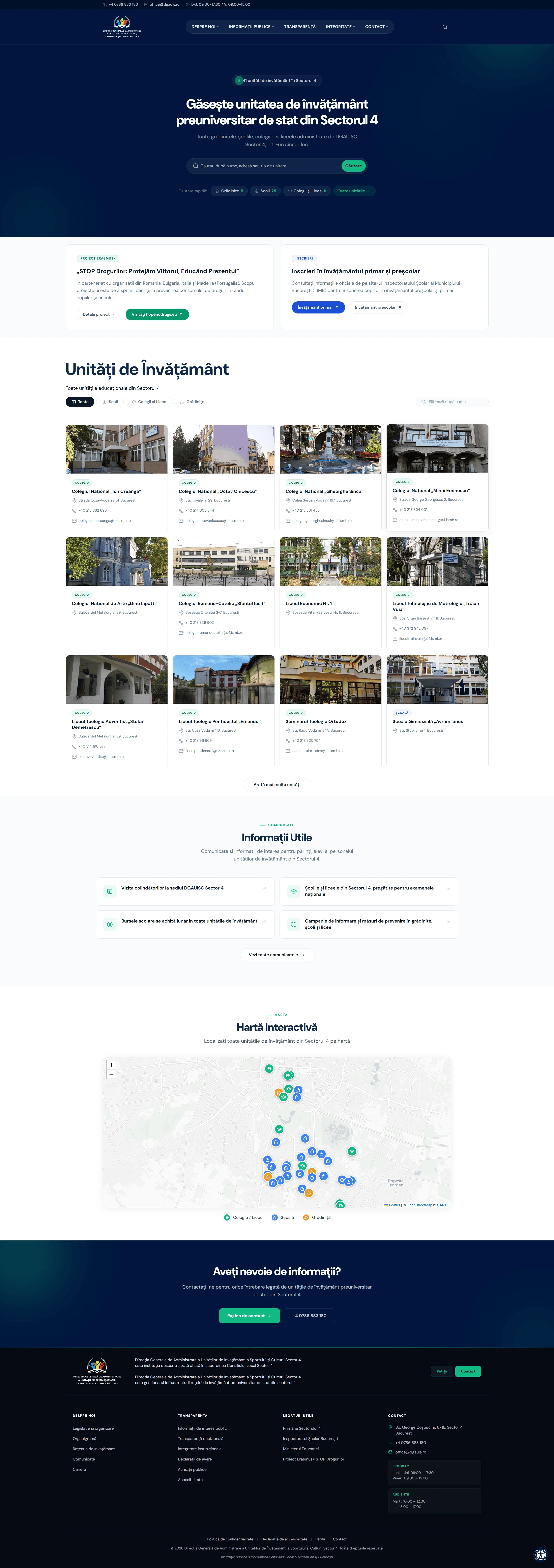
DGAUIS is the Sector 4 directorate in Bucharest responsible for the infrastructure of the district's state pre-university education network — 40 institutions at launch: schools, kindergartens, colleges and special schools, covering everything from buildings and grounds to sport facilities and cultural spaces. They needed an official platform serving parents, students, school staff, suppliers and citizens of the sector: one structure holding both the information about each institution and the department's public-information duties, rather than a set of unrelated documents.
The Challenge
A public-sector website has to serve several audiences at once, each arriving with a very specific task: parents trying to find out when their child's school has its next open day, suppliers checking a public procurement notice, citizens filing a formal complaint. Everyone comes for one thing, and the information they need is usually scattered across long lists and PDF documents.
DGAUIS had 40 institutions to represent, legal transparency obligations to meet, petition and complaint intake to handle, and a public audience with widely varying technical confidence — from teachers in their 20s to grandparents picking up a kid from kindergarten. The site had to work for all of them.
The Approach
We built the platform specifically for this project (dgauis, a site-specific architecture — no commercial theme, no page builder), using established components where they were the right call: Leaflet for the map and a mature solution for the forms. A public-sector site has particular demands: accessibility is non-negotiable (by law), performance matters (many visitors arrive on a phone, on whatever connection they have), and maintainability matters (the internal team has to be able to update content for years without calling us).
We treated the 40 education institutions as the core dataset of the platform. Everything else — the transparency sections, the forms, the institutional communication — was built around them. And the institutions needed to be explorable in multiple ways: visually (on a map), by type (schools, colleges, kindergartens, special schools), and by search.
The Solution
- Platform built for this project (
dgauis) — site-specific architecture, no page builder, no commercial theme - Interactive Leaflet map plotting all 40 educational units from a project-specific
dgauisMapDataJSON structure and a bundledleaflet-map.js. 500px tall, responsive, zoomable, with markers that open to reveal institution details. - Filterable and searchable institution directory at
/unitati/:- Filter by type: All / Schools / Colleges & High Schools / Kindergartens
- Live search with a 3-character minimum
- Ctrl+K keyboard shortcut opens the search immediately
- "Load more" pagination instead of infinite scroll
- Additional display controls for text size, contrast mode and a light/dark toggle
- Contact Form 7 with proper Romanian translations for all error messages and labels
- Petition and complaint intake flow for formal citizen submissions
- Audiențe (public office hours) block — the specific hours when each department is open to citizens
- Extensive transparency sections: data protection information, asset declarations, public procurement notices, ethics code, whistleblowing contacts
GovernmentOrganizationstructured data (JSON-LD)- DM Sans typeface self-hosted (WOFF2)
- Responsive fluid typography using
clamp() - Dark navy hero (#00163d) with clean white content areas
Key Moments
The Leaflet map
Information about the institutions a directorate oversees usually reaches the public as a list inside a PDF. We put them on an interactive map instead. A parent looking for "schools in my area" can pan the map, tap a marker, and see that institution's address and contact details on the spot, without leaving the page. The map data lives in a structured JSON file built for the project, so when an institution is added or moves, the internal team updates the data file and the map reflects it immediately.
Ctrl+K search
Most visitors will click the search button. Frequent visitors and keyboard users — journalists researching education policy, school staff looking up a specific institution, parents coming back for the second time — prefer keyboard commands. We added Ctrl+K as a discoverable shortcut that opens the directory search from anywhere on the site. It doesn't replace ordinary navigation, but it cuts the number of steps for anyone looking up an institution in a hurry.
Accessibility, from structure to display controls
The legal baseline for public-sector sites in the EU is the EN 301 549 standard, which points to WCAG 2.1 AA. We built to WCAG 2.2 AA: semantic structure, full keyboard navigation, a skip link, checked contrast, forms with correct Romanian labels and error messages, and support for reduced-motion preferences.
On top of that layer we added controls visible on every page for text size, contrast and a light/dark toggle. They are a useful addition rather than a substitute for accessibility built into the page structure — and the platform's conformance status remains the one recorded in the institution's published accessibility statement.
No page builders
We chose an architecture built for the project's requirements, with no commercial theme and no visual page builder, because the information structure and the accessibility requirements needed more control than a template would have given us. The Sector 4 team works with the platform every day, and the structure can be maintained and extended over time with the necessary technical updates.
The Stack
Custom-coded platform (dgauis architecture)
Self-hosted DM Sans (WOFF2)
Leaflet 1.9.4 for the interactive institution map
Custom leaflet-map.js with JSON data source
Contact forms (Romanian localisation)
Schema.org (GovernmentOrganization)
Speculation-rules prefetch API
Responsive fluid typography (clamp)
Built to WCAG 2.2 AA
The Result
A public-sector platform that works for its actual users, not just for the compliance checklist. Parents find institutions on a map. Suppliers find procurement notices. Citizens submit formal complaints. Press finds transparency reports. At launch the main pages were green across Core Web Vitals, and accessibility was checked automatically with axe-core and manually from the keyboard, with WCAG 2.2 AA as the benchmark.